Over time, as we have added new reports and reporting options, the Reports Menu has got longer to the point that it could potentially scroll off the bottom of the screen. Therefore we have spent some time this week reformatting and reordering the menu so that similar reports are now grouped. We feel this makes the report list easier and more intuitive. (There is a video below that covers these changes and also provides details on the various options you have when running reports)
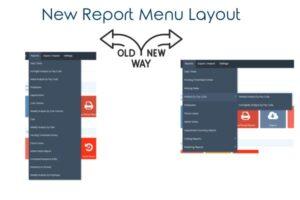
As part of this work, we have also updated the functionality of a couple of reports and added two new reports.
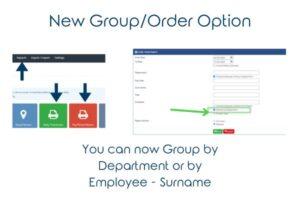
Updated Repors – When running the Daily Timesheets and Pay Period report (the buttons on the main screen) or the Daily Totals report from the menu you now have the ability to group/order the report by Department >> Employee Surname (the current way) or by Employee Surname (new).
If you want to run the report in employee order simply Untick the box that says Subtotal by Department.
New Reports –
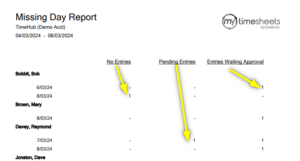
- Missing Dates – This report is useful if you want to see any employee who has Not completed a timesheet for a given day in the pay period. It also highlights any staff who have a timesheet that is still Pending ie Started but not complete as well as any timesheet that has not been Approved. Note: We recommend that this report is always run before you export your data to your payroll as it will show any employees who would not be paid for these days.
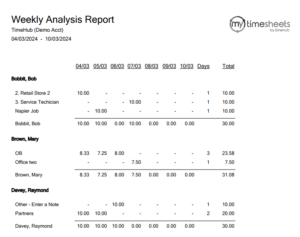
- Costing – Weekly Analysis by Employee – In addition to the existing Costing reports which Group by Cost Centre/Project/Job then employee, we have added a report that Groups by Employee and then lists the Cost Centre/Project/Job they have worked on in the week.
This quick video shows the new Menu Layout, Reporting options and New Reports. Note: Some reports may not be available to you if you are not using our Costing or Rostering features.
If you have any questions about this update or the new reports please touch base with the team here – SuccessTeam Chat