Report printing error caused by the Adobe Acrobat browser extension
We have identified the cause of a report printing issue affecting a small number of MyTimesheets users.
What is happening?
On affected computers, selecting “Print” on a report may result in an error page instead of displaying the PDF report.
Our investigation has confirmed that MyTimesheets is successfully generating and sending the PDF report to the browser. However, on some computers where the Adobe Acrobat browser extension is enabled, the extension appears to interfere with the way the PDF is opened.
The issue does not affect the report data or the generation of the PDF.
How do I fix it?
The current workaround is to disable the Adobe Acrobat browser extension and allow Chrome or Edge to display PDF files using its built-in PDF viewer.
Google Chrome
1. Open Chrome.
2. Click the three dots in the top-right corner.
3. Select Extensions and then Manage extensions.
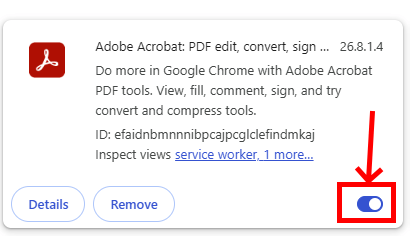
4. Find Adobe Acrobat.
5. Turn the Adobe Acrobat extension off.
6. Return to MyTimesheets and try printing the report again.
You do not need to uninstall Adobe Acrobat from your computer. This only disables the Adobe Acrobat extension within Chrome.
Microsoft Edge
If you are experiencing the same problem in Microsoft Edge:
1. Open Edge.
2. Click the three dots in the top-right corner.
3. Select Extensions and then Manage extensions.
4. Find Adobe Acrobat.
5. Turn the extension off.
6. Return to MyTimesheets and try the report again.
Will I still be able to view PDFs?
Yes.
Chrome and Edge both have built-in PDF viewers, so PDF reports from MyTimesheets can still be displayed directly in your browser without the Adobe Acrobat extension.
Disabling the browser extension does not uninstall Adobe Acrobat or Adobe Acrobat Reader from your computer. You can continue to use the Adobe application normally for PDF files saved on your computer.
What caused the problem?
We have reproduced the issue and confirmed that enabling or disabling the Adobe Acrobat browser extension changes the behaviour.
The issue appears to be related to a recent update to the Adobe Acrobat browser extension and the way the extension handles PDFs generated directly by a website.
We have reported the issue and will continue monitoring updates to the Adobe Acrobat extension. If a future Adobe update resolves the problem, we will update this page.
Need help?
If you are experiencing the report printing error and are unsure whether the Adobe Acrobat extension is installed, please contact TimeHub Support and we can help you check your browser configuration.